6 min read

Mohammed Al-Anazi
Product Manager at Salla
Would you like to read a summary of the article?
Summarize with ChatGPT
Summarize it with Claude
Summarize it with Perplexity

Automatic delivery means that the digital product reaches the customer after payment is completed according to the setup you prepared, without having to send each code manually. However, it does not begin simply by writing "instant delivery" in the card's description. You need a valid code under the correct option, or a ready supplier and integration, and an order paid through a method that supports automated fulfillment. After that, test what the customer actually received, not just the payment status alone.
The Salla digital cards page explains the delivery workflow, and the Salla guide for adding a card product explains product setup and post-purchase delivery. Review the requirements of your method, supplier, plan, and settings before promising the customer a specific delivery speed.
Which fulfillment method suits your product?
Method | What you need to prepare | What to test? |
|---|---|---|
Codes added inside the card | The correct code for each value, country, and available status | Deduction of a single code, its display to the customer, and its linkage to their order |
Fulfillment via an integrated supplier | Matching product, integration, balance, and supplier availability | Transfer of the order to the supplier and fulfillment outcome upon success and failure |
Temporary manual dispatch | A designated person, clear service hours, and a log that prevents duplicate codes | Response speed, accuracy matching, and avoiding promises of automated delivery |
If some products are fulfilled manually and others automatically, clearly state the delivery method for each product. Do not apply a generic "instant delivery" claim across the entire store while there are options requiring human review.
Three distinct moments in a single order
In the automated journey, do not equate "payment succeeded" with "order fulfilled" and "correct code received." Each moment requires proof: payment confirmation, fulfillment status in the store or supplier app, and what was displayed to the customer with the correct value and region. The Salla tutorial for adding cards explains how to configure the delivery method, and the Help Center explains managing product codes. If you use an app like Card System, review its specific integration and support guidelines; do not assume the rules for local inventory codes are the same as recharging a game account via a supplier.
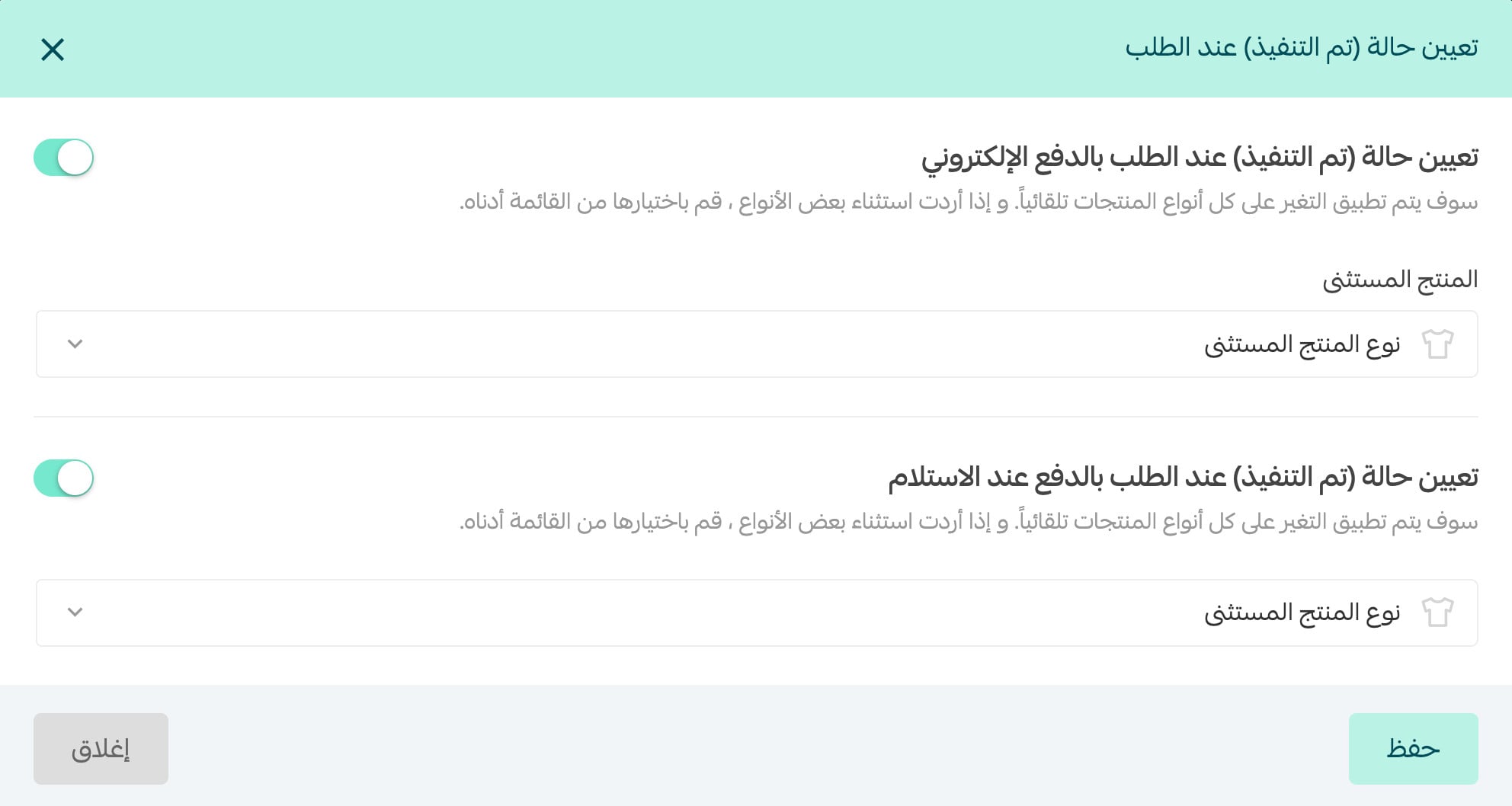
The following screenshot from the guide on customizing order status in Salla shows the setting to change certain orders to "Completed" after electronic payment. This is merely an order status and does not prove on its own that the customer received the correct code; verify delivery from the product or supplier side as well.
Test three scenarios before writing "instant delivery" on the page: a successful order, an option running out of stock, and a successful payment with a supplier failure or timed-out response. Document for each case what the customer will see, who will review the order, and the timeframe you can commit to. During failure testing, do not use a real open order risking a customer's code; test using your account tools or in coordination with the supplier, then document what you were able to test and what you could not.
A ready follow-up template if fulfillment fails
"We have received your order no. [ ] and payment is complete. We are currently reviewing the delivery of the [value and region] card and will update you before [realistic time]. There is no need to reorder while we verify the fulfillment status." Adjust the message after confirming the payment status, and do not state that the code was sent unless there is clear proof of delivery.
Test the customer journey from page to code
Choose a low-value card that can be dedicated to testing, then open the store from a mobile device just as a new customer would. Review the name, value, country, and price. Complete the payment using a test method suitable for your account; if the test requires a live code, treat it as consumed once revealed. Afterward, inspect the order page and the email sent to the customer, then log the code and order on the store's backend. Do not include the actual code in the test report.
Checkpoint | Recorded Outcome |
|---|---|
Pre-payment | Option, description, and region match the product |
Post-payment | Order status is clear and no duplicate charge occurred |
Fulfillment | A single valid code was assigned or a correct supplier response was returned |
Customer receipt | Customer finds instructions and code via the advertised method |
Log | You can link the code or supplier status to the order number |
Failure | A follow-up message, designated owner, and escalation step exist |
What if payment succeeds but delivery fails?
Start with the order number and its status, then check whether the issue stems from an unavailable code, a country/value option lacking inventory, supplier balance, or an integration delay. Do not send a replacement code before confirming the fate of the first one to avoid fulfilling the order twice. Inform the customer that you are reviewing fulfillment, provide an update timeframe you can commit to, and document the resolution.
Repeat testing whenever you change suppliers or add a country, denomination, or payment method. The success of one card does not guarantee that all options work. Before launching, also test what happens when codes run out or supplier fulfillment hangs; this edge case may reveal glitches that do not appear during a successful order.
Once tests pass, launch your digital card store on Salla with verified products and a delivery workflow you fully understand.
A prompt to turn test results into an action plan
Checklist before the first announcement
☐ Clarified the delivery method and follow-up timeframe on the product page.
☐ Verified available codes or supplier balance and active integration.
☐ Tested purchase, payment, and receipt on mobile.
☐ Linked fulfillment status to the order number without exposing codes.
☐ Tested an out-of-stock or failure scenario and identified who handles it.
Frequently Asked Questions
Does successful payment mean the code was delivered?
No. Review what the customer saw, the order page, and notifications, then check the code status or supplier fulfillment in the store backend. The payment step alone does not prove delivery.
Can I claim "instant delivery" for all cards?
State a promise that accurately reflects each product and its fulfillment method after testing it. If fulfillment is manual or relies on a supplier that may delay, clarify that and avoid generalizing a speed you cannot fulfill.
Do I need to test every country and denomination?
Test options that differ in code pool, supplier, region, or fulfillment workflow. Do not extrapolate the success of one option to untested ones, especially after supplier updates.
Start with a card you can fulfill reliably, then set up your store on Salla. If you want to create an account right away, register directly.

Mohammed Al-Anazi
Product Manager at Salla
68
Article
Featured author

E-commerce
How did Tech Card store make more than SAR 20,000 in a month through affiliate marketing?
Tech Card started its journey selling digital products in 2020. As the business grew, it leveraged Salla's tools to expand sales channels and boost conversion rates. Affiliate marketing helped generate over SAR 20,000 in sales in a single month—accounting for around 2% of the store's total sales—while abandoned cart reminders helped recover approximately 3.5% of customers, according to the published success story. This experience highlights how businesses can combine reaching new customers with maximizing value from existing visitors, without relying solely on increasing ad spend.
7 minutes read
Arwa Abdulkarim

E-commerce
You spent on ads and got the orders… where's the profit?
Your campaign may bring in more orders without leaving you with a better profit. Learn how to calculate what remains after product costs, discounts, order fulfillment, and advertising, so you know what to review before increasing the budget or stopping the campaign.
9 minutes read
Arwa Abdulkarim

E-commerce
Between losing profit and losing customers… how do you price your products?
Pricing your products starts with understanding your costs, what customers compare you to, and the value they get for the price. Learn how to balance attracting customers with maintaining your profit margins, and how to test your decisions before rolling them out across your store.
9 minutes read
Arwa Abdulkarim
E-commerce
Your store sales are increasing, but where is the liquidity?
Your store is making sales, but cash flow isn't enough to pay suppliers and purchase new stock? Discover where your money is going, and learn how to review inventory and expenses before liabilities pile up.
8 minutes read
Arwa Abdulkarim