5 min read

Mohammed Al-Anazi
Product Manager at Salla
Would you like to read a summary of the article?
Summarize with ChatGPT
Summarize it with Claude
Summarize it with Perplexity

You add a digital card in Salla by going to Products, clicking "Create New Product", selecting "Digital Card", and entering the product details, price, and image. After that, you configure the country options, denomination/value, and codes according to the card type, and review what the customer will see before publishing. These steps are based on the Salla Help Centre updated in October 2026; please refer to the current interface during setup as field names may change.
This article helps you set up your first product correctly. The official guide includes screenshots and detailed steps; keep it open alongside your control panel. Before entering any details, verify the card supplier, resale rights, and the region in which it works, so that a supplier error does not turn into a misleading description in your store.
What should you prepare before opening the product form?
Keep a record containing the card's official name, issuing entity, denomination, account country or region, currency, purchase price, selling price, code expiry date (if any), and support method. Make sure whether what you are selling is credit balance, a game code, or a subscription. Different types require different descriptions for the customer.
Here is an example of clear phrasing without fabricating details: "[Platform] balance card worth [Value], for [Region confirmed by supplier] accounts. The code will arrive via [Method you tested] after [Valid payment condition]. Please check your account region before purchasing." Replace the brackets with verified details, and do not use "All Countries" unless confirmed by the card issuer.
What are the steps within Salla?
According to the official guide, navigate to the Products menu, create a digital card, save the basic details, and then manage codes, country options, and denominations. Codes can be entered manually or uploaded in a file using the template provided by the platform. The guide mentions duplicate checks upon upload, but this does not replace thoroughly auditing the file and its source before using it.
Field or Decision | How to review it from the customer's perspective? |
|---|---|
Product name and image | Do they distinguish the card from a different subscription or game? |
Denomination and price | Is the credit value clear, and is it separate from the price the customer pays? |
Country or region | Does the option match the customer's account and the card's terms? |
Code and expiry | Is the code valid, unused, and displayed in its proper status? |
Description and support | Does the customer know how to receive and redeem it, and whom to ask if issues arise? |
If certain codes are tied to a specific country, place them under the correct country option. The Help Centre explains that "All Countries" is an option for codes not restricted to a specific country; do not select it merely to broaden the reach of a card that carries actual geographic restrictions. For products with multiple denominations, match each denomination's code with its corresponding price and description before publishing.
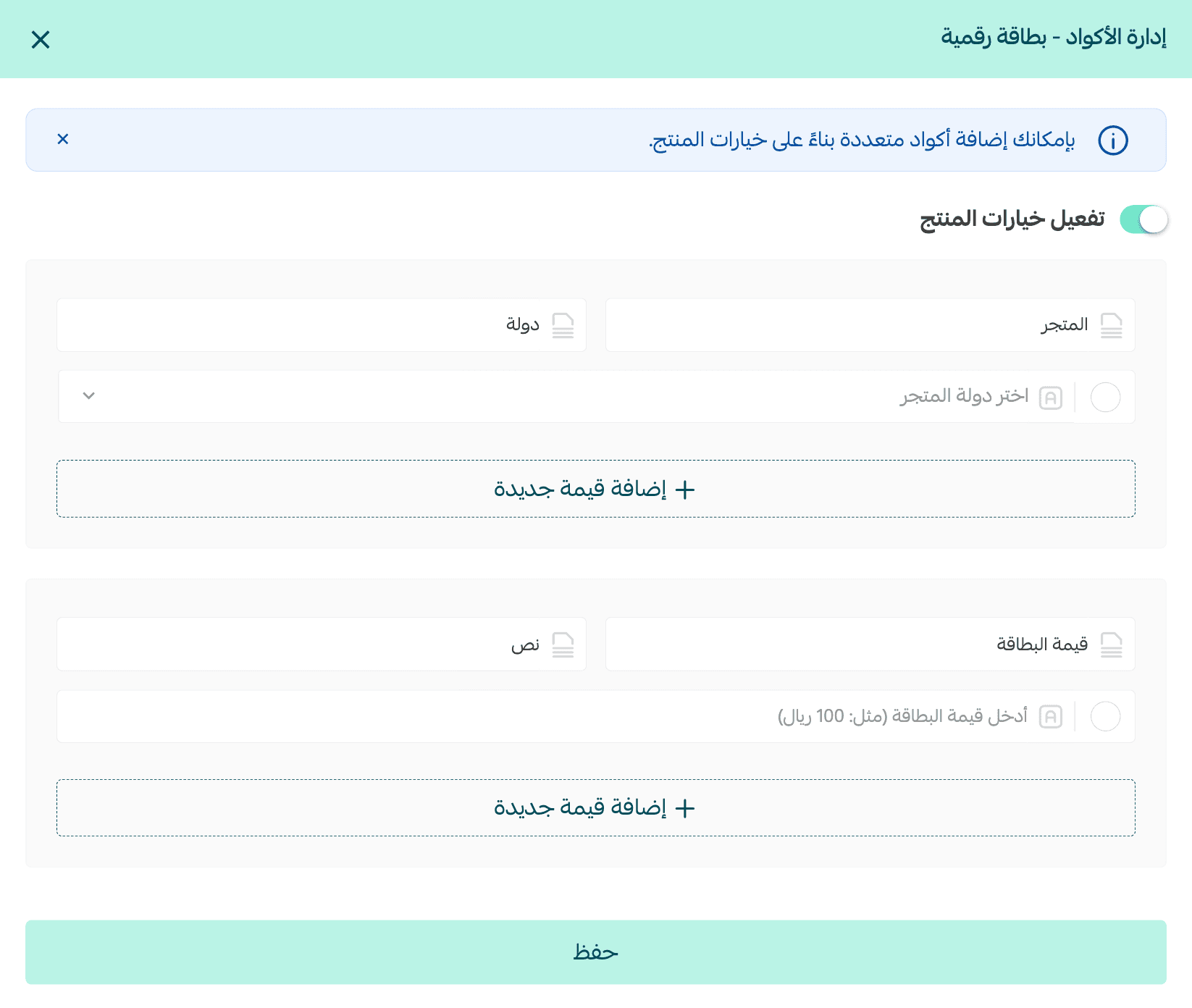
Two screenshots from the card setup within Salla
The first Help Centre screenshot shows where to set the product's country and denominations within "Code Management". This step comes before writing a promise such as "Works for Saudi accounts" in your description; select what matches the card's actual terms. Field names may vary slightly with interface updates, so refer to the current guide for adding cards during execution.
The second screenshot shows the number of added codes, price fields, the minimum quantity alert, and the option to bulk-upload codes. The presence of these fields does not mean that the five codes shown in the image belong to your product or that the example prices are applicable to you. Take from it only the workflow: enter codes from a source whose terms permit resale, verify their count and uniqueness, set your price after factoring in your costs, and then test a single order.
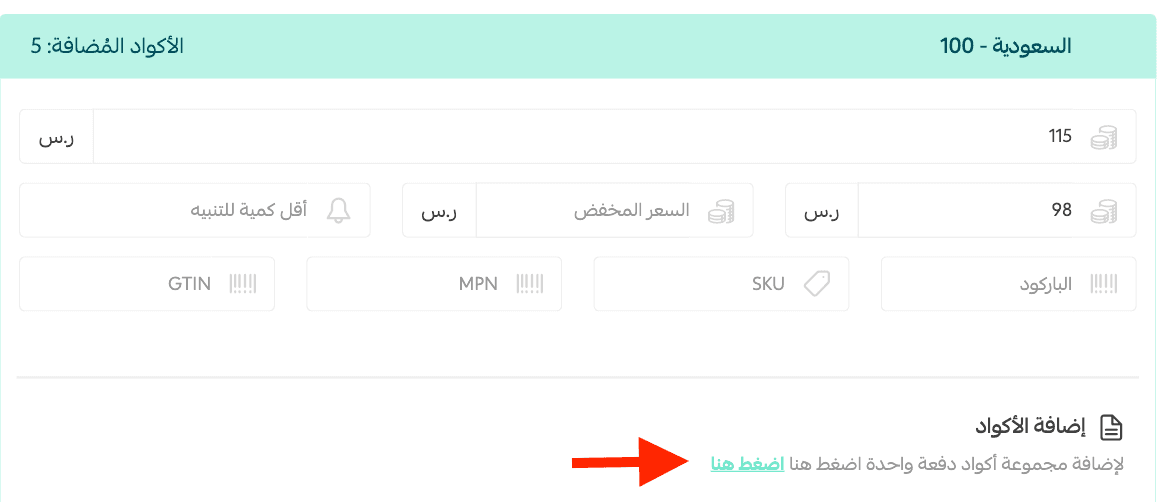
If you offer two options for region or denomination, open each option from the customer interface and verify that it displays the correct price and description. The Salla guide notes that the system checks for duplicate codes upon entry; nevertheless, keep a record of the code sources and do not re-upload a batch that has been sold or exposed for testing.
How to audit codes after adding them?
From the Digital Cards Log, you can review the status of the code, product, country, denomination, and the associated order number when using the log. Monitor expired or sold codes, and do not copy the list of codes into a file accessible to the entire team. Grant access only to those who need it, in accordance with your store settings and policies.
If you use an integrated supplier instead of uploading codes manually, review their integration instructions and ensure the product, region, and denomination match. Do not mix two fulfillment workflows within a single product before knowing which one will process the order. Start setting up your store's card on Salla, then proceed to test a complete order before launching your marketing.
Prompt to review product description
Checklist before publishing the product
☐ Source, resale rights, and compatibility are confirmed.
☐ Name, image, denomination, and region match.
☐ Selling price is clear, and cost price is logged for internal review.
☐ Codes are placed under the correct option, and no previously exposed codes are used.
☐ Page opened on mobile and the description read from the perspective of a new customer.
Frequently Asked Questions
Can I upload codes via a file?
Yes, the Salla Help Centre explains how to use the template and upload CSV or XLSX files with duplicate verification. Use the current template and review the outcome after uploading.
When should I select "All Countries"?
Only when the card itself is not restricted to any country according to the terms of its issuer and supplier. Selecting this option in the interface does not alter the issuer's terms.
Is the code sent to the customer immediately upon adding it?
Adding it is merely a setup step. Payment and fulfillment methods must be configured according to your setup, followed by a test order to verify what actually happens once an order is placed.
Once the details are configured, set up your card store on Salla. If you haven't created an account yet, start registering directly.

Mohammed Al-Anazi
Product Manager at Salla
68
Article
Featured author

E-commerce
How did Tech Card store make over 20,000 SAR through affiliate marketing in one month?
Tech Card started its journey in selling digital products in 2020. As the business grew, it leveraged Salla's tools to expand sales channels and improve checkout conversion rates. Affiliate marketing helped generate over SAR 20,000 in sales within a single month, accounting for approximately 2% of the store's total sales. Meanwhile, abandoned cart reminders helped recover around 3.5% of customers, according to data from the published success story. This experience demonstrates how businesses can combine reaching new customers with maximising value from existing visitors, without relying solely on increasing ad spend.
7 minutes read
Arwa Abdulkarim

E-commerce
You paid for ads and the orders rolled in… but where's the profit?
Your campaign may bring in more orders without leaving you with better profit. Learn how to calculate what remains after product costs, discounts, order fulfilment, and advertising, so you know what to review before scaling your budget or pausing the campaign.
9 minutes read
Arwa Abdulkarim

E-commerce
Between losing profit and losing customers… how do you price your products?
Pricing your products starts with understanding your costs, what the customer is comparing them to, and the value they receive in return. Learn how to strike the right balance between attracting customers and maintaining profitability, and how to test your strategy before rolling it out across your store.
9 minutes read
Arwa Abdulkarim

E-commerce
Your store sales are growing, but where is the cash flow?
Your store is making sales, but the cash flow isn't enough to pay suppliers and purchase new stock? Find out where your money is going, and learn how to review inventory and expenses before liabilities pile up.
8 minutes read
Arwa Abdulkarim